What a CV does and how it makes the locomotive behave is set by the locomotive decoder, not the DCC system. A CV is a setting for a particular item/feature of a decoder. A CV determines how the loco behaves, the loco address, the lights, the sounds, etc. Think of the CV as a labeled folder with a number. This is the CV number.
Inside the CV "folder" is a piece of paper labeled with a number. That is the CV value.
The value of a CV can be configured in a few different ways.
A CV can be a list of items you select from, like different lighting effects, sounds, or locomotive behaviours. You pick a number from the list of choices and enter that as the CV value.
A CV can be like a knob or slider with a range of values. Example: 1 to 255. This type of CV is used for speed control and sound volumes.
Now the cool part. For some CVs, especially for lights, you can COMBINE settings to get exactly what you want it to do!
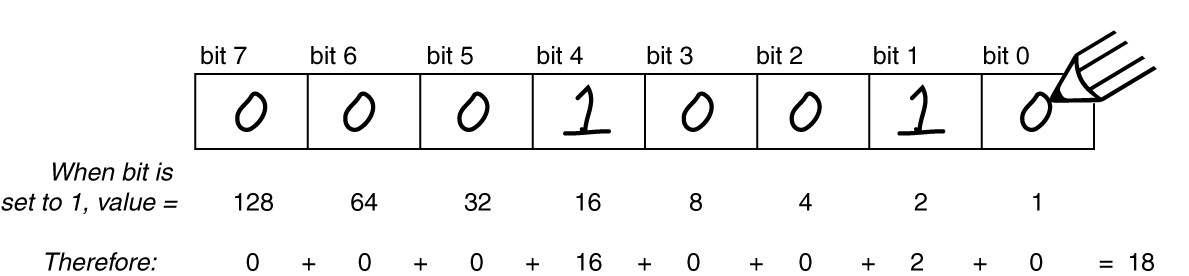
The information below is from http://www.dccwiki.com. A big thanks to Mitch Schwenk for putting it all together.
A Configuration Variable is a memory location in the decoder that controls the behavior of the decoder. Think of it as a preferences file that saves the settings on a computer. Once set, the value will be retained unless the memory is changed or becomes corrupted.
Another term is Configuration Register, which refers to Configuration Variable 29, which stores settings for several basic decoder functions.
As with any computer, decoders must be programmed by the user to reach their full potential. While they come with basic "factory default" settings, most users will want to customize the decoder address, motor control, lights, sound, and other functions to meet their specific needs. You do so by editing the CVs, or Configuration Variables, in the decoder. Some CVs use values ranging from 0 to 255; others use their space in the decoder's memory as a bank of eight on/off switches. While this lets you do a lot with very little memory, it can get very complex for those of us who aren't on speaking terms with binary code.
Software is available that simplifies decoder programming. Many people agree that JMRI is the best free, open-source software available. JMRI often rivals commercially available software
Comments